
Tor bridges (optional)
Some ISP are blocking connections to known Tor relay IPs. Bridges aren't in the public Tor directory, so they can't be IP-blocked. Visit bridges.torproject.org
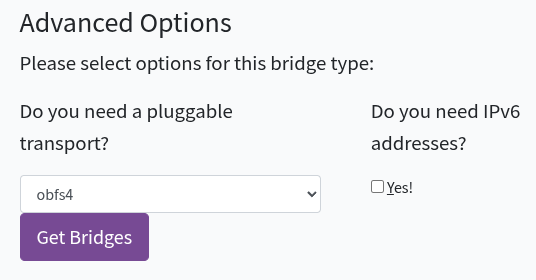
Click on Get bridges. The next screen will give two obfs4 lines, save them for later use on this page.
Tor service
Temporalily connect as root
sudo su -
Install apt-transport-https
apt install apt-transport-https
Create a new file
nano /etc/apt/sources.list.d/tor.sources
Types: deb deb-src
URIs: https://deb.torproject.org/torproject.org/
Suites: trixie
Components: main
Signed-By: /usr/share/keyrings/deb.torproject.org-keyring.gpg
Add a GPG key
wget -qO- https://deb.torproject.org/torproject.org/A3C4F0F979CAA22CDBA8F512EE8CBC9E886DDD89.asc | gpg --dearmor | sudo tee /usr/share/keyrings/deb.torproject.org-keyring.gpg >/dev/null
Install Tor
apt update
apt install tor deb.torproject.org-keyring
Edit
nano /etc/tor/torrc
HiddenServiceDir /var/lib/tor/monerod
HiddenServicePort 18089 127.0.0.1:18089    # interface for wallet ("RPC")
HiddenServicePort 18084 127.0.0.1:18084    # interface for P2P network
Optional: To use Tor bridges, add the two lines saved earlier. Format it like
# bridges requested at https://bridges.torproject.org
UseBridges 1
Bridge obfs4 <ip1>:<port1> <fingerprint1> cert=<cert1> iat-mode=0
Bridge obfs4 <ip2>:<port2> <fingerprint2> cert=<cert2> iat-mode=0
Enable and restart Tor
systemctl enable tor
systemctl restart tor
Display .onion server address and copy it into clipboard
cat /var/lib/tor/monerod/hostname
long-v3-onion-address.onion
Edit Monero config file
nano /monero/monerod.conf
Uncomment following lines and update .onion address using clipboard
# Tor/I2P: broadcast transactions originating from connected wallets over Tor/I2P (does not concern relayed transactions)
# tx-proxy=i2p,127.0.0.1:4447,12,disable_noise  # I2P
tx-proxy=tor,127.0.0.1:9050,12,disable_noise  # Tor

# Tor/I2P: tell monerod your onion address so it can be advertised on P2P network
# anonymous-inbound=long-b32-address.b32.i2p,127.0.0.1:18085,24         # I2P
anonymous-inbound=long-v3-onion-address.onion:18084,127.0.0.1:18084,24 # Tor
Disconnect from root
exit
Check it's working
curl -x socks5h://127.0.0.1:9050 http://long-v3-onion-address.onion:18089/get_info
One line should display
{
  "adjusted_time": 1781435397,
.
.
.
  "start_time": 0,
  "status": "OK",
I2P service
Temporalily connect as root
sudo su -
Install i2p
wget -q -O - https://repo.i2pd.xyz/.help/add_repo | bash -s -
apt update
apt install i2pd
Create a tunnel for P2P et RPC ports
cat << EOF > /etc/i2pd/tunnels.conf.d/monero-mainnet.conf
[monero-node]
type = server
host = 127.0.0.1
# Anonymous inbound port
port = 18085
inport = 0
keys = monero-mainnet.dat

[monero-rpc]
type = server
host = 127.0.0.1
# Restricted RPC port
port = 18089
keys = monero-mainnet.dat
EOF
Restart i2pd
systemctl restart i2pd
Display node's i2p address and copy it into clipboard
curl -s http://127.0.0.1:7070/?page=i2p_tunnels | grep -Eo "[a-zA-Z0-9./?=_%:-]*" | grep "18089"
long-b32-address.b32.i2p:18089
Edit Monero configuration file
nano /monero/monerod.conf
Uncomment following lines and update .b32 address using clipboard
# Tor/I2P: broadcast transactions originating from connected wallets over Tor/I2P (does not concern relayed transactions)
tx-proxy=i2p,127.0.0.1:4447,12,disable_noise  # I2P
tx-proxy=tor,127.0.0.1:9050,12,disable_noise  # Tor

# Tor/I2P: tell monerod your onion address so it can be advertised on P2P network
anonymous-inbound=long-b32-address.b32.i2p,127.0.0.1:18085,24         # I2P
anonymous-inbound=long-v3-onion-address.onion:18084,127.0.0.1:18084,24 # Tor
Disconnect from root
exit
Check it's working
curl -x socks5h://127.0.0.1:4447 http://long-b32-address.b32.i2p:18089/get_info
One line should display
{
  "adjusted_time": 1781435397,
.
.
.
  "start_time": 0,
  "status": "OK",